PixVerse AI
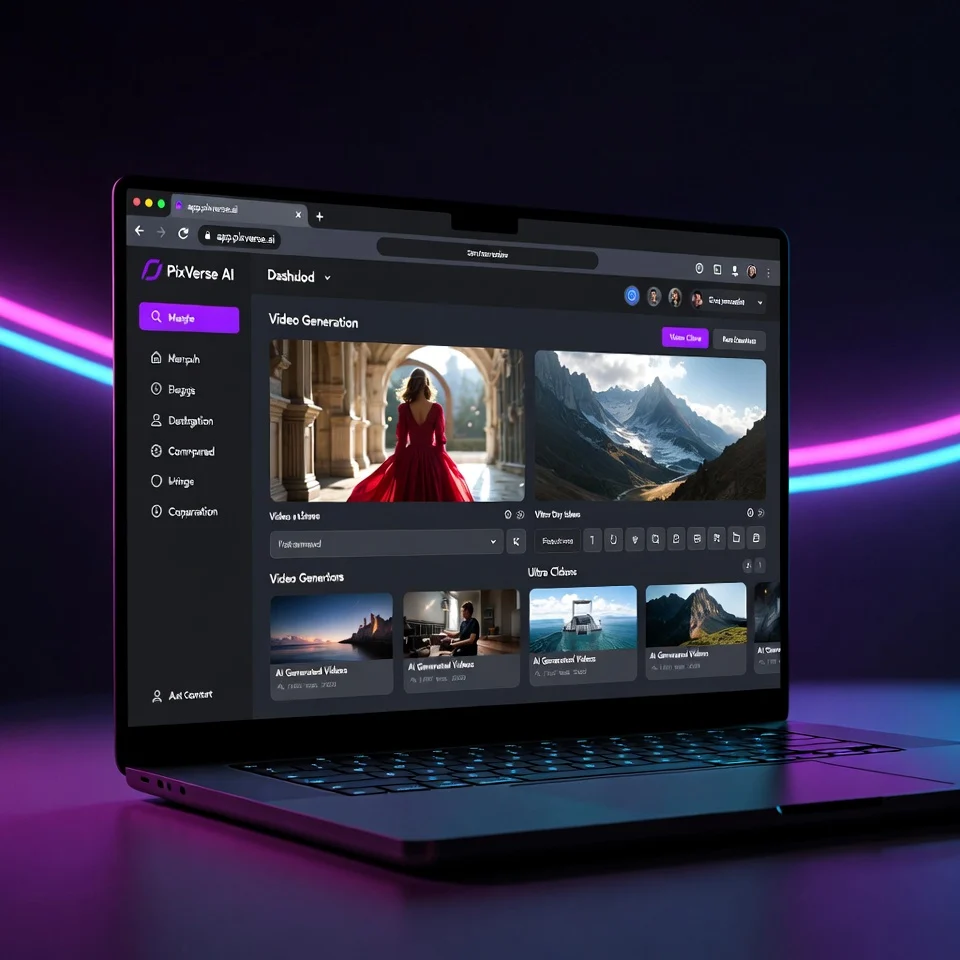
PixVerse AI is a new-generation AI video generator that turns simple text prompts and images into short, high-quality videos. Instead of dealing with complex timelines, keyframes, or editing software, you describe a scene and PixVerse AI handles the motion, style, and visuals for you.
If you are new to AI video tools, this platform feels surprisingly approachable. It is built for creators who want results fast. You type what you want to see, pick a style, and the tool generates cinematic-looking clips in minutes. That is why pixverse ai is getting attention among content creators, marketers, and social media users looking for quick video production.
PixVerse AI Key Features
PixVerse AI stands out because it focuses on creative output rather than technical complexity. Here are the features that matter most in real use.
Text to Video Generation
This is the core feature. You write a prompt like “a futuristic city at night with flying cars” and PixVerse AI generates a short video based on your description. The motion feels natural, not like stitched images.
Image to Video Animation
You can upload a still image and turn it into a moving scene. This is useful for:
-
Thumbnails that need motion
-
Character animation
-
Giving life to AI-generated images
Cinematic Styles
PixVerse AI offers multiple visual styles such as:
-
Cinematic and realistic
-
Anime-inspired
-
Fantasy and sci-fi
-
Artistic and stylized looks
These styles help creators match their brand or content theme easily.
Simple Web-Based Interface
No software installation is needed. The app pixverse ai runs directly in your browser, making it friendly for beginners and lightweight devices.
Fast Rendering
Compared to many new ai video tool platforms, PixVerse AI delivers results quickly. Short videos usually render within a few minutes depending on server load.
Social Media Friendly Output
Videos are optimized for short-form platforms like:
-
Instagram Reels
-
TikTok
-
YouTube Shorts
This makes pixverse ai videos practical for everyday content creation.
How to Use PixVerse AI (Step-by-Step)
Even if you have never used an AI video generator before, PixVerse AI is easy to start with.
-
Visit the official website and sign up
Go to app.pixverse.ai and create a free account. -
Choose your creation type
Select text to video or image to video. -
Enter your prompt
Describe the scene clearly. Simple but specific prompts work best. -
Pick a style
Choose a cinematic or artistic style based on your goal. -
Generate the video
Click generate and wait for the AI to render your clip. -
Download or share
Once done, you can download the video or use it directly on social platforms.
From personal testing, short prompts with clear actions give better results than long complicated descriptions.
Pros of PixVerse AI
-
Beginner-friendly interface
-
High-quality motion compared to many free tools
-
No heavy software or GPU required
-
Multiple visual styles for creativity
-
Ideal for short-form content
Cons of PixVerse AI
-
Limited control over fine video details
-
Free version has generation limits
-
Longer or complex scenes may look inconsistent
-
Not designed for long videos or full movies
PixVerse AI is creative-first, not editor-first. That is important to understand before using it.
Best Use Cases for PixVerse AI
PixVerse AI shines in quick, creative scenarios rather than long productions.
Content Creators
Perfect for YouTubers, TikTokers, and Instagram creators who need engaging visuals fast.
Marketers
Great for:
-
Ad concepts
-
Promo visuals
-
Social media campaigns
Storytelling and Concepts
Writers and designers can visualize ideas without hiring a video editor.
Thumbnails and Motion Graphics
Short animated clips can boost click-through rates.
Experimenting With AI Video
If you are new to ai video generator tools, PixVerse AI is a low-friction starting point.
PixVerse AI Pricing
PixVerse AI currently follows a freemium model.
Free Plan
-
Limited video generations
-
Basic styles
-
Slower rendering during peak times
This is why many users search for pixverse ai free options.
Paid Plans
Paid plans usually include:
-
More credits per month
-
Faster rendering
-
Higher-quality outputs
-
Priority access to new features
Pixverse ai price details may change, so it is best to check the official dashboard for the latest plans.
Comparison With Other AI Video Tools
Here is how PixVerse AI compares with similar platforms.
PixVerse AI vs Runway ML
-
PixVerse AI is simpler and faster
-
Runway offers deeper editing control
-
PixVerse is better for beginners
PixVerse AI vs Pika Labs
-
PixVerse focuses on cinematic short clips
-
Pika offers more experimental animations
-
PixVerse feels more polished for social media
PixVerse AI vs Kaiber
-
Kaiber is music-video focused
-
PixVerse AI is more general-purpose
-
PixVerse has a gentler learning curve
Overall, PixVerse AI is best for speed and simplicity rather than advanced customization.
PixVerse AI Alternatives
If PixVerse AI does not fit your needs, these tools are worth checking out.
-
Runway ML – advanced editing and professional workflows
-
Pika Labs – experimental and creative AI video effects
-
Kaiber AI – music and audio-driven visuals
-
Luma AI – realistic 3D-style video generation
-
Synthesia – avatar-based explainer videos
Each tool serves a slightly different purpose, so your choice depends on your goal.
FAQs About PixVerse AI
Is PixVerse AI free to use?
Yes, PixVerse AI offers a free plan with limited credits. Paid plans unlock more usage and features.
Can PixVerse AI create long videos?
No, it is mainly designed for short clips and social media content.
Is PixVerse AI good for beginners?
Yes. The interface is simple and does not require video editing experience.
What type of videos does PixVerse AI create best?
Short cinematic clips, concept visuals, and creative animations.
Are PixVerse AI videos copyright safe?
Generally yes for personal and commercial use, but always review the platform’s license terms before publishing.
PixVerse AI is a strong entry in the fast-growing AI video space. It does not try to replace professional video editors. Instead, it focuses on speed, creativity, and accessibility. For beginners, marketers, and creators who want eye-catching visuals without technical hassle, this tool makes a lot of sense.
If your goal is to experiment with AI-generated video or create short-form content quickly, PixVerse AI is worth trying. Start with the free plan, test different prompts, and see how it fits into your workflow.
- Pricing: Freemium
Leave a Comment